
BC Game Deposit and Withdraw Methods – Problems, How To, Time
When it comes to online crypto casinos, BC Game has established itself as one of the leading platforms, offering an exciting range of games for users who prefer to wager using cryptocurrencies. Whether you’re a seasoned gambler or a newcomer, understanding how to deposit and withdraw funds, as well as the potential problems you might encounter, is crucial for a seamless experience. In this blog, we’ll guide you through the deposit and withdrawal methods, common problems, how to resolve them, and the expected transaction times at BC Game.
Deposit Methods at BC Game
BC Game supports a wide range of cryptocurrencies, allowing players to make deposits using popular coins like Bitcoin (BTC), Ethereum (ETH), Litecoin (LTC), Tether (USDT), and many others. Here’s a breakdown of the deposit process:
How to Deposit on BC Game
1. Log In to Your Account
* First, visit the BC Game website and log into your account. If you don’t have an account, you’ll need to create one by following the sign-up process.
2. Go to the Deposit Section
* Once logged in, navigate to the “Deposit” section, typically found in the user dashboard or under the account settings.
3. Select Your Preferred Cryptocurrency
* BC Game supports a wide range of cryptocurrencies. Select the cryptocurrency you want to use for your deposit. Popular options include:
* Bitcoin (BTC)
* Ethereum (ETH)
* Litecoin (LTC)
* Tether (USDT)
* Ripple (XRP), and many others.
4. Copy the Deposit Address
* After selecting your desired cryptocurrency, BC Game will generate a wallet address. Copy this address or scan the QR code displayed.
5. Initiate the Deposit from Your Wallet
* Head to your crypto wallet or exchange and initiate the transaction by pasting the copied address into the recipient field. Be sure to enter the correct amount that you wish to deposit.
6. Confirm the Transaction
* Once you confirm the transaction, the cryptocurrency will be sent to your BC Game account. Network confirmations are required for most cryptocurrencies, and the time it takes for your deposit to appear can vary depending on the blockchain.
While depositing funds is generally straightforward, there are a few issues you might encounter:
1. Transaction Delays
* Problem: Sometimes, cryptocurrency transactions can take longer than expected due to network congestion or low transaction fees.
* Solution: Check the transaction status on the blockchain using the transaction ID. If you see a delay, the issue is most likely due to the blockchain and not BC Game.
2. Incorrect Deposit Address
* Problem: If you accidentally copy the wrong deposit address, your funds could be lost.
* Solution: Always double-check the deposit address before confirming your transaction. BC Game will never ask you to send funds to a third-party address.
3. Minimum Deposit Limits
* Problem: BC Game has minimum deposit limits for each cryptocurrency. If your deposit is below the required amount, it may not be processed.
* Solution: Make sure your deposit meets the minimum requirements for the cryptocurrency you’re using. You can find this information on the deposit page of your account.
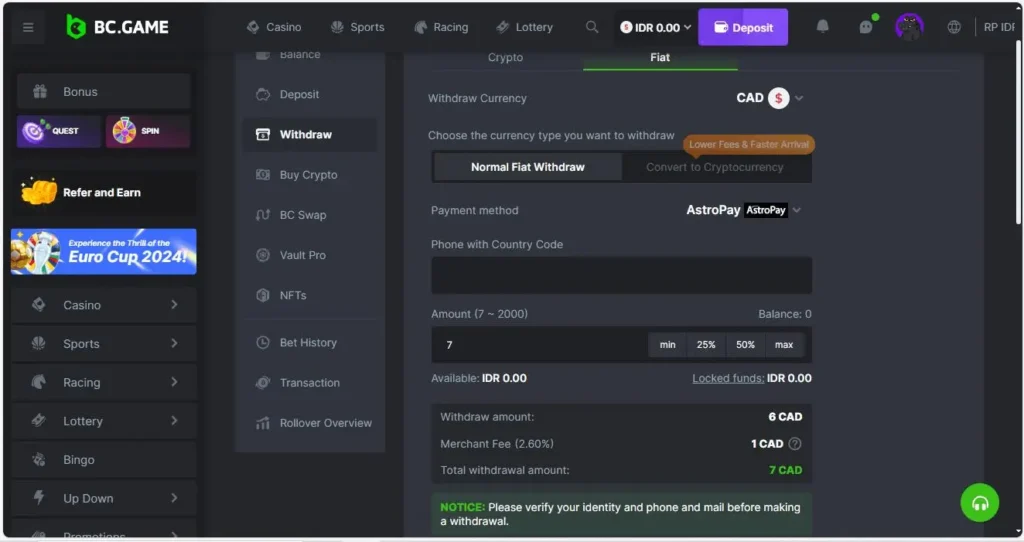
How to Withdraw from BC Game

1. Log In to Your Account
* To begin, log into your BC Game account where you’ve accumulated your winnings.
2. Go to the Withdrawal Section
* Navigate to the “Withdraw” section of the website. This section will allow you to request withdrawals in a wide range of cryptocurrencies.
3. Select the Cryptocurrency for Withdrawal
* Choose the cryptocurrency you want to withdraw. Similar to the deposit process, BC Game allows you to withdraw your funds in various coins, including Bitcoin, Ethereum, Litecoin, and others.
4. Enter Your Withdrawal Address
* Enter the wallet address where you want to receive your funds. Double-check the address to ensure it’s correct. Incorrect addresses can result in the permanent loss of your funds.
5. Confirm the Withdrawal
* After entering your withdrawal amount and wallet address, confirm the transaction. Most cryptocurrencies require a few network confirmations before the withdrawal is completed.
6. Complete the Process
* Once the transaction is processed and confirmed by the blockchain, your funds will be sent to your wallet.
While withdrawals at BC Game are typically smooth, there are potential issues that users may face:
1. Withdrawal Pending
* Problem: Sometimes, a withdrawal may remain pending for an extended period.
* Solution: First, ensure that the minimum withdrawal amount for the cryptocurrency you’re using is met. Additionally, check the network’s status and the blockchain’s confirmation process. If issues persist, contact BC Game support.
2. Incorrect Withdrawal Address
* Problem: If you accidentally enter the wrong withdrawal address, you risk losing your funds permanently.
* Solution: Always double-check the wallet address you are withdrawing to. BC Game typically won’t process a withdrawal unless the address is correct.
3. Withdrawals Are Delayed
* Problem: Cryptocurrency transactions can sometimes be delayed due to network congestion.
* Solution: Track your withdrawal status using the transaction ID. If the blockchain confirms the transaction and it’s still not showing up in your wallet, contact BC Game’s customer support.
4. Withdrawal Fees
* Problem: Cryptocurrency withdrawals come with network fees, which vary depending on the coin.
* Solution: BC Game charges minimal fees, but keep in mind that network fees may fluctuate. Check your withdrawal page for up-to-date fee information before completing the withdrawal.
The time it takes for deposits and withdrawals to be processed on BC Game depends on a few factors:
Deposit Time
* Bitcoin: Bitcoin transactions typically require 3-6 network confirmations, which can take 10-30 minutes, depending on network congestion.
* Ethereum: Ethereum transactions usually take 5-15 minutes, depending on the network’s traffic.
* Other Cryptocurrencies: Other coins like Litecoin, Dogecoin, and Tether can have shorter confirmation times, typically ranging from 5-15 minutes.
Withdrawal Time
* Bitcoin: Withdrawals usually take 1-2 hours to be processed, but the actual confirmation time on the blockchain may take longer depending on network conditions.
* Ethereum: Ethereum withdrawals generally take 15-30 minutes, though network delays can impact this.
* Other Cryptocurrencies: For coins like Litecoin or Tether (USDT), withdrawals can take anywhere from 5 minutes to an hour, depending on the network.
Conclusion
BC Game provides a variety of deposit and withdrawal methods that cater to the needs of cryptocurrency users. While the process is generally straightforward, users may encounter some issues related to transaction delays, incorrect addresses, or network congestion. By understanding the steps and potential problems involved in depositing and withdrawing funds on BC Game, you can have a smoother and more efficient experience.
If you ever run into difficulties, BC Game’s customer support team is available 24/7 to help resolve issues quickly. Understanding the expected transaction times and the best practices for avoiding common problems can go a long way in ensuring your experience at BC Game is positive. Whether you’re depositing funds or cashing out your winnings, taking the time to understand the process will save you from unnecessary frustration.